 July 5, 2026
How to Build a Portfolio Website That Lands Jobs (Custom, Wix, WordPress & AI)
Your portfolio website is more than an online resume, it’s your personal brand, open 24/7 to impress recruiters, clients, and collaborators. In this guide, you’ll learn exactly how to plan, build, host, and maintain a portfolio website customized to your profession – developer, software engineer, photographer, designer, or video editor – using either custom code, Wix, WordPress, or AI-powered tools.
Every must-have page, design principles, templates, GitHub workflows, deployment options, and a strategy to keep your portfolio fresh is covered in this guide.
Choosing Your Approach: Custom, Wix, WordPress, or AI Builder
| Approach | Best For | Pros | Cons |
|---|---|---|---|
| Custom-Coded (HTML/CSS/JS, React, Next.js, etc.) | Developers, software engineers, those wanting total control | Full flexibility, fast performance, excellent for demonstrating coding skills, easily hosted on GitHub Pages/Netlify | Requires technical skill, more time to build and maintain |
| WordPress | Designers, photographers, video editors, bloggers who need a CMS | Huge theme/template ecosystem, powerful blogging, easy content updates, thousands of plugins | Needs hosting setup, regular maintenance (updates, backups), can be slower without optimization |
| Wix or Squarespace | Non-technical creatives, freelancers wanting a quick, all-in-one solution | Drag-and-drop simplicity, hosting included, beautiful templates, fast setup | Less customization freedom, can look generic, harder to migrate away, monthly cost |
| AI-Powered Website Builders | Anyone who wants an ultra-fast start with AI-generated layouts and content | Generates full sites from prompts, designs, and copy in minutes, often includes hosting | Output may need heavy refinement, less granular control, potential for generic AI “feel” |
Essential Pages Every Portfolio Website Must Have
Regardless of profession, these core pages form the backbone of a high-converting portfolio. I’ve added role-specific nuances for each.
Home Page
This page is the first impression with elevator pitch and clear call-to-action (CTA).
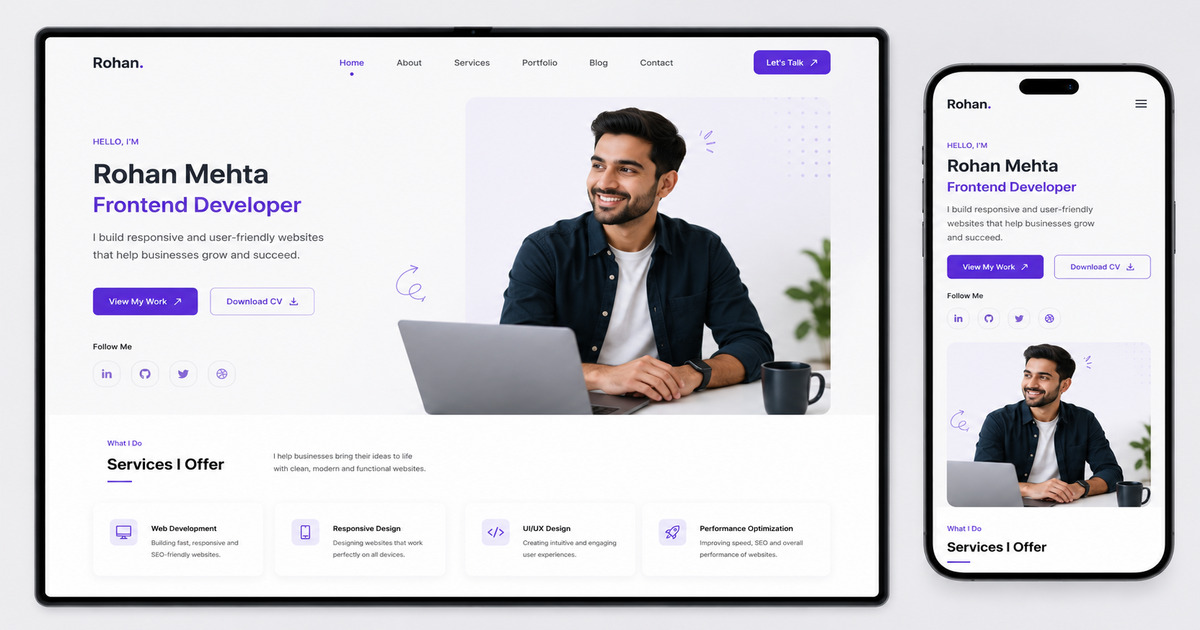
Hero section (First main section on Home page below Nav bar) with your name, title, a professional photo or avatar, a short tagline (e.g., “Full‑stack developer building accessible web apps”), and primary CTA buttons (View My Work / Contact Me).
-
Role‑specific tips:
-
Developer: Embed an interactive terminal or a live code snippet.
-
Photographer: Full‑screen background slider of your best shot.
-
Video Editor: Autoplay (muted) showreel as a hero background.
-
Designer: Minimalist layout with an animated logo or typography.
-
About Page
-
Elements: Your background, skills, what drives you, a friendly photo, and a downloadable resume/CV link. Include testimonials or client logos for social proof.
-
Role‑specific:
-
Software Engineer: Emphasize problem‑solving, technologies, and team collaboration.
-
Photographer: Share your artistic philosophy and gear you use.
-
Video Editor: Mention genres (commercial, documentary, social media) and software (Premiere, DaVinci).
-
Portfolio / Work / Projects Page (Proof of Work)
-
Structure: A filterable grid or case study list. For each project include a thumbnail, title, short description, your role, technologies used, and a link to live project/case study detail page.
-
Case study detail page (highly recommended): Problem → Approach → Solution → Results. Add visuals, code snippets, before/after comparisons, or video walkthroughs.
-
Role‑specific:
-
Developer/Engineer: Link to GitHub repos, live demos, and talk about architecture decisions.
-
Designer: Showcase the design process with wireframes, mockups, prototypes (Figma links).
-
Photographer/Videographer: Curated galleries, behind‑the‑scenes clips, client stories.
-
Services / What I Do Page (If You’re a Freelancer)
-
Elements: Clearly list services with deliverables, packages, and starting prices. Include a FAQ section and a direct inquiry button.
-
Example for a video editor: “Social Media Reels Package – up to 60s, color grading, sound design, 2 revisions and pricing”.
Resume / CV Page (or Embedded PDF)
-
For corporate jobs: An HTML‑styled resume with timeline, skills with proficiency bars, education, certifications. Offer a one‑click PDF download.
-
Use structured data (JSON‑LD) to help Google understand your resume. You can either make it accessible on the internet or set it to no index if you share it privately
Contact Page
-
Contact form (protected by CAPTCHA to prevent spam)
-
Email address
-
Social media links (LinkedIn, GitHub, Behance, Vimeo/YouTube)
-
Scheduling link (Calendly)
-
Embed a map only if relevant
Blog / Insights (Optional)
-
Blogging showcases expertise, drives traffic, and keeps the site fresh. Write about your field, project breakdowns, or tutorials.
Role‑Specific Portfolio Blueprints
Here are role-specific portfolio blueprints, featuring content designed to instantly hook recruiters and land jobs.
Developer / Software Engineer Portfolio
-
Focus: Code quality, problem-solving ability, and real‑world impact.
-
Pages: Home, About, Projects (with GitHub stats), Resume, Blog (tech articles), Contact.
-
Must‑haves: Links to GitHub/GitLab, contribution graph, live project demos, “Star” counts. Show tests, CI/CD badges, and clean code snippets.
-
Extra: A “Now” page (what you’re currently learning) adds personality.
Photographer Portfolio
-
Focus: Visual storytelling, speed, and full‑bleed imagery.
-
Pages: Home (full‑screen gallery), Portfolio (galleries by category: weddings, portraits, landscapes), About, Investment/Pricing, Client Galleries (password‑protected proofing), Blog, Contact.
-
Must‑haves: High‑resolution images optimized for web (WebP format), lazy loading, lightroom‑style proofing plugins in WordPress, integrated print store.
-
Templates: Use photography‑specific themes like Oshine, Uncode (WordPress) or Wix’s “Photography” templates.
Designer Portfolio (UI/UX, Graphic, Brand)
-
Focus: Process, case studies, and design thinking.
-
Pages: Home, Work (case study grid), About, Services, Playground/Experiments, Contact.
-
Must‑haves: Before/after sliders, embedded Figma prototypes, style guides, user research data. A minimal design that doesn’t compete with your work.
-
AI use: Use AI tools to generate initial color palettes or layout ideas, then customize.
Video Editor Portfolio
-
Focus: Motion, pacing, and versatility.
-
Pages: Home (showreel auto‑play), Work (categorized videos), About, Services, Contact.
-
Must‑haves: Embedded Vimeo/YouTube players (no autoplay sound), duration tags, client names. Show breakdowns – raw footage vs final edit. Password‑protected client review sections.
-
Hosting: Use a platform that supports video without bandwidth penalties (Vimeo Pro embed), with site hosted on fast CDN.
Design & Templates
If you don’t start from scratch, start with a template and tweak it heavily.
-
For Custom Code (Static/React):
-
HTML5 UP: Free, modern, responsive HTML5 templates.
-
Tailwind UI / Tailwind Toolbox: Beautiful components and templates for Tailwind CSS.
-
Next.js / Gatsby Starters: Pre‑built portfolio themes on GitHub.
-
Cruip: Premium Tailwind templates for landing pages/portfolios.
-
-
For WordPress:
-
Themeforest: Massive library of professional themes (e.g., “Uncode”, “Salient”, “Bifrost” for portfolios).
-
WordPress.org themes: Free options like “Astra” + Elementor/Gutenberg blocks, “Portfolio Web”, “Neve”.
-
GeneratePress + GenerateBlocks: Lightweight combo ideal for speed.
-
-
For Wix:
-
Wix offers a dedicated “Portfolio” category in its template library. Choose one and use the AI design assistant to change layouts.
-
Design principles (apply regardless of tool):
-
Visual hierarchy: Highlight your best work first.
-
White space: Let content breathe.
-
Consistent typography: No more than two font families.
-
Accessible contrast & alt text.
-
Mobile‑first responsive design.
-
Fast load times (optimize images, minimize plugins).
-
Clear CTAs – never make visitors guess what to do next.
Using GitHub for Version Control & Portfolio Deployment
GitHub isn’t just for hosting code – it’s a powerful deployment and collaboration tool for developers and beyond.
How to Use GitHub for Your Portfolio
-
Version control: Track every change to your site’s code. Even if you use Wix/WordPress, you can version theme customizations (e.g., export a WordPress theme and store in a private repo).
-
Open‑source your portfolio (developers) to show your GitHub presence. Include a great README with badges, live link, and tech stack.
-
GitHub Pages (free hosting) for static sites: Perfect for custom‑coded HTML/CSS/JS or frameworks like React (built and deployed via GitHub Actions).
-
Collaborate with designers: Store design assets, Figma files, and content drafts in a repository to track iterations.
Typical Developer Portfolio GitHub Workflow
-
Create a repository (e.g.,
my-portfolio). -
Develop locally with branches (
main,dev). -
Push code to GitHub.
-
Use GitHub Actions to automatically build and deploy to GitHub Pages or Netlify on push to
main. -
Your live site URL:
https://yourusername.github.ioor custom domain.
Hosting Your Portfolio: Where to Put It
| Hosting Option | Best For | Cost |
|---|---|---|
| GitHub Pages | Static sites, dev portfolios | Free |
| Netlify / Vercel | Static & serverless functions, React/Next.js | Free tier |
| Cloudflare Pages | High‑performance static sites, global CDN | Free |
| WordPress‑Optimized Hosting | Self‑hosted WordPress | Paid Hosting |
| Shared cPanel Hosting | Budget WordPress, small traffic | Paid |
| Wix / Squarespace | All‑in‑one, zero‑tech hassle | Paid |
For photographers/video editors with large media files: Choose a host with a CDN (all above) and offload video to Vimeo/YouTube to keep hosting costs low.
How to Deploy: Step-by-Step Procedure
Credits: PedroTech
Deploy a Custom Static Site to GitHub Pages
-
Build your site (plain HTML/CSS/JS or build with React
npm run build). -
Push the built files to a
gh-pagesbranch or configure GitHub Actions to deploy frommain. -
Go to repo Settings → Pages → select branch and root folder.
-
Your site is live. Add your custom domain in Settings and update DNS.
Deploy a React / Next.js Site to Netlify
-
Push your code to GitHub.
-
Log into Netlify, click “Add new site” → “Import an existing project” → connect GitHub.
-
Set build command (e.g.,
npm run build) and publish directory (buildorout). -
Deploy. Netlify auto‑deploys on every push. Set up a custom domain in the Netlify dashboard.
Launch a WordPress Portfolio
-
Purchase hosting and a domain (e.g., SiteGround).
-
Install WordPress (most hosts do this in one click).
-
Choose a portfolio theme, install demo content, and customize.
-
Install essential plugins: SEO (Rank Math), caching (WP Rocket or free W3 Total Cache), security (Wordfence), contact form (WPForms).
-
Point your domain to the hosting nameservers.
Deploy a Wix Site
-
Build in Wix Editor.
-
Connect a domain (purchased through Wix or elsewhere).
-
Upgrade to a premium plan to remove Wix ads and connect custom domain.
-
Publish.
Keeping Your Portfolio Updated
An outdated portfolio hurts more than no portfolio. Set a recurring calendar reminder.
Quarterly Refresh Checklist
-
Add new projects: At least 1–2 new pieces per year.
-
Remove weak/outdated work: If it no longer represents your skill level, archive it.
-
Update resume/CV and PDF download.
-
Check all links and contact forms.
-
Update technology stack (e.g., add “Docker, Next.js” if you’ve learned them).
-
Refresh your “About” text to reflect current goals.
Technical Maintenance
-
Custom sites: Update dependencies regularly, review performance with Lighthouse. Use Renovate bot to automate dependency PRs.
-
WordPress: Update core, themes, plugins weekly. Run backups before updates. Use a staging environment for major changes.
-
Wix: Wix handles platform updates. You just need to update content and design tweaks.
-
Content updates via AI: Use ChatGPT/Claude to rewrite your bio, project descriptions, or generate fresh blog post ideas, then edit them to retain your voice.
Leveraging AI to Build Your Portfolio Website Faster & Smarter
AI tools can drastically accelerate creation, even if you custom‑code everything.
AI Site Builders & Components
-
Framer AI: Generate a complete, responsive portfolio page from a text prompt. Excellent for designers.
-
10Web AI Builder: Recreates any website design on WordPress using AI, then lets you customize.
-
Wix ADI (Artificial Design Intelligence): Answers a few questions and creates a tailored portfolio with images and text.
-
Vercel: Generate UI components with Tailwind code from natural language descriptions – perfect for custom portfolios.
-
Durable: Instant AI‑generated website for freelancers, with hosting.
AI for Content & Images
-
Copywriting: Draft your tagline, about page, project case studies, and meta descriptions. Always personalize and fact‑check.
-
Logo & imagery: DALL·E 3, Midjourney, or Adobe Firefly can create hero backgrounds, avatars (be ethical), or mood images for projects. Photographers can use AI to generate placeholder shots while curating the real gallery.
-
Image optimization: Tools like TinyPNG or AI‑based ShortPixel automatically compress images without quality loss.
AI for Coding Assistance
-
GitHub Copilot & Cursor: Supercharge your IDE; generate boilerplate layouts, forms, and animations in seconds.
-
ChatGPT/Claude: Debug your deployment script or generate the entire GitHub Actions workflow.
Always review AI output. Your portfolio must reflect your authentic voice and skills. Use AI as an assistant, not a replacement for judgment.
Final Checklist Before You Launch
-
Clear, professional photo and logo.
-
Mobile responsive and fast (Google PageSpeed Insights score > 90).
-
Contact form works and sends to your email.
-
All project links open in new tab and are live.
-
Resume PDF downloadable.
-
Custom domain (example.com, yourdomain.in).
-
SSL certificate active (padlock in browser – Netlify, GitHub Pages, Wix, and good WordPress hosts provide free SSL).
-
Social media icons linked correctly.
-
Legal pages: Privacy Policy (especially if using analytics), Cookie consent banner.
-
Sitemap.xml submitted to Google Search Console if you want your portfolio website to be indexed or set it to no-index.